A spreadsheet in the shape of Excel 5 and at parity with Gnumeric, written from scratch in C on GTK 4, Pango and Cairo. A grid, a formula bar, a name box, two toolbars and sheet tabs along the bottom. No ribbon.

The sister project of Word42, built on the same principles: a small, honest codebase that does one thing well.

Get it View on GitHub

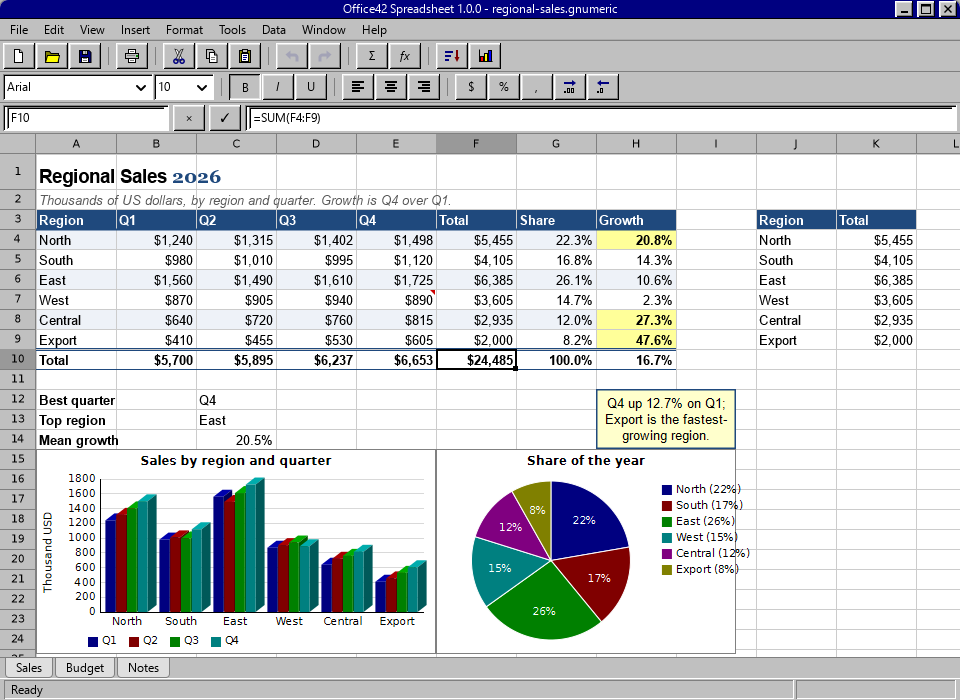
Office42 Spreadsheet showing a regional sales sheet: a title set in two fonts in one cell, a styled heading row, currency and percent formats, a total row with SUM and INDEX/MATCH formulas, conditional formats on the growth column, a note, a text box, frozen panes, a three-dimensional column chart, a pie chart with labels, and three sheet tabs
A regional sales book: conditional formats, a note, frozen panes, a three-dimensional column chart, a pie chart and three sheet tabs.
610functions, every one Excel 2003 has and Gnumeric's own besides
1,048,576 × 16,384rows by columns, and an empty cell costs nothing
17kinds of chart, in two or three dimensions
3platforms built on every push: Linux, macOS and Windows

What it does

A working spreadsheet, not a demo. Everything below ships today, and docs/PARITY.md is an honest estimate of how far it is from Excel and from Gnumeric.

The window

  • Excel's keys: Enter steps down, Tab steps right, Tab-Tab-Enter returns to the column the row began in
  • The formula bar is the same edit as the cell, every reference in its own colour
  • Function names offered as you type, and the signature of the call the caret is in
  • Point mode, F4 on the dollars, the fill handle, drag-and-drop, AutoComplete
  • Zoom, freeze and split panes, custom views, outline groups, a second window on the same book
  • Undo of everything, deleting a sheet included

Formatting

  • Excel 5's tabbed Format Cells dialog
  • Number formats in Excel's own code language: #,##0.00;[Red](#,##0.00), [h]:mm
  • Rich text with several fonts in one cell
  • Borders of every style and colour, pattern fills, indent, rotation, merged cells
  • Named cell styles that restyle every cell wearing them, and conditional formats
  • Formats are interned, so a thousand bold cells share one record

Formulas

  • Excel's precedence, A1 and $A$1, whole rows and columns, 3-D references, names
  • Structured references into tables, array constants, LET and LAMBDA
  • Array formulas with Ctrl+Shift+Enter, and dynamic arrays that spill
  • Demand-driven recalculation with dirty flags; circular references reported, not followed
  • Statistics in two passes so they are accurate; the distributions on regularised incomplete gamma and beta functions
  • Bond arithmetic on the five day-count bases, the .INTL dates, the Excel 365 text and array functions

Charts and objects

  • Column, bar, line, area, pie, doughnut, radar, bubble, stock, surface, box and whiskers, histogram, polar, contour and XY scatter
  • Trendlines, error bars, a second value axis, chart sheets
  • Redrawn from the cells every time they are painted
  • Pictures, shapes, text boxes, grouped objects, notes and hyperlinks
  • The nine form controls of Excel's Forms toolbar, each bound to a cell

Data

  • Sort, Find and Replace, AutoFilter and Advanced Filter, Text to Columns, Remove Duplicates
  • Subtotals, Consolidate, Scenarios, Data Validation, Tables
  • Pivot Tables with calculated fields and page filters
  • Goal Seek and a Solver
  • Descriptive statistics, correlation, covariance, regression, histogram, ANOVA, rank and percentile, moving average
  • Each one is a single undo step

Files

  • Gnumeric's .gnumeric, which carries everything
  • Excel's .xlsx and .xls, with formulas, styles, charts, shapes, tables, names and notes
  • OpenDocument .ods, checked against LibreOffice both ways
  • HTML, CSV, DIF, SYLK, LaTeX and Lotus 1-2-3
  • Printing, print preview, page setup with headers and footers, PDF out and in
  • The zip and OLE2 containers are a few hundred lines each; no library was added

Automation

  • Python instead of Visual Basic: a console with book and sheet bound
  • Scripts kept in the file, and a macro recorder that writes Python
  • =PY("expression") in a cell; functions defined in Python appear in the Function Wizard
  • A book that arrives with scripts offers to run them and never runs them by itself
  • A SQLite database beside the book or inside it, asked from Data ▸ Get Data or =SQLVALUE(...)

Beyond Excel

  • Gnumeric's functions that Excel leaves out: the complex functions, twenty-eight random distributions, number theory
  • FOURIER, HPFILTER, INTERPOLATION, PERIODOGRAM
  • The movable feasts, and Black and Scholes with its Greeks
  • Spelling with Hunspell

The terminal

  • office42-calc drives the whole engine from standard input
  • The model and the formula engine never include GTK, so the engine builds as a library of its own
  • office42 --screenshot renders the window to a PNG with nobody at the keyboard
  • It is how every change is checked

How it works

The sheet is sparse: cells live in a hash table keyed by a packed row and column, and an empty cell costs nothing. Formulas are parsed once and kept as trees. Each formula cell records the rectangles it reads; when a cell changes the sheet marks stale every formula whose rectangles contain it, and theirs in turn, and nothing is recomputed until something asks.

The evaluator does not know what a sheet is. It reads values through a callback, which is why the engine builds as a library of its own and can be driven from a terminal:

$ ./builddir/src/office42-calc
A1 = 10
A2 = 20
B1 = =SUM(A1:A2)*2
B1
B1      60      (=SUM(A1:A2)*2)
dump
      A             B
1     10            60
2     20

Six layers, each of which may only see the ones below it. formula/ never includes model/, and neither includes GTK. Those two rules are the whole architecture.

src/util/      cell addresses, values, number formats, dates
src/model/     the sheet, the book, charts, shapes, undo
src/formula/   the parser, the evaluator, the function library
src/io/        .gnumeric, .xlsx, .xls, .ods, CSV and the rest, PDF, SQLite
src/script/    Python: the office42 module, the interpreter
src/ui/        the grid, the window, the dialogs
src/main.c        the window's entry point
src/calc-main.c   the terminal front-end
data/          menus, icons, stylesheet
docs/          the guide, the architecture, the parity review

docs/ARCHITECTURE.md goes into detail.
Two programs to aim at

Gnumeric

For what a free spreadsheet should be able to do and for how to do it right. Gnumeric was built by people who cared about numerical correctness more than about features, and that is the standard to hold to.

Microsoft Excel 5 (1993)

For what it should look like and how it should behave: a grid, a formula bar, a name box, two toolbars and sheet tabs along the bottom. No ribbon.

Not planned: the ribbon, Visual Basic, co-authoring, Power Query and the Quattro Pro and Applix formats. docs/ROADMAP.md says why.

Get Office42

Version 1.0.0. On Windows it is in the Microsoft Store; on Linux, macOS and Windows it builds from source, and every push to main is built and smoke-tested on all three.

Building

Office42 needs a C11 compiler, Meson, Ninja, and GTK 4.10 or newer with Pango, Cairo and gdk-pixbuf. Python, Hunspell, SQLite and poppler-glib are used if they are there.

git clone https://github.com/office-42/office42.git
cd office42
meson setup builddir
meson compile -C builddir
./builddir/src/office42        # the window
./builddir/src/office42-calc   # the engine, from a terminal

Per-platform dependency lists are the same as Word42's; see its docs/BUILD.md. The toolbar icons are SVG, so gdk-pixbuf wants its SVG loader at run time (librsvg2-common on Debian and Ubuntu).

Windows

Get it from the Microsoft Store

The Store package is made from the same source on every push; docs/WINDOWS-STORE.md has the procedure.

Continuous builds

The Linux, macOS and Windows workflows build every push with --werror and smoke-test the engine. The Windows job also uploads a bundle that runs without MSYS2, and the Store package made from it, as artifacts of each run.

Sample books

The repository's samples/ folder holds books that exercise the formats and the function library in .xlsx, .xls and .fods.

Source on GitHub

Documentation

The user guide

Every menu, every dialog, the number-format codes, the keyboard and the terminal front-end.

The parity review

A review of the code, module by module, and an honest estimate of how far it is from Excel and from Gnumeric.

Architecture

The layers, the sparse sheet, the dependency graph, interned formats and the undo records.

Python

The console, the office42 module, the macro recorder and =PY().

The database

A SQLite database beside the book or inside it, and how a cell asks it a question.

Roadmap

What is left, in the order it is being done, and what is not planned and why.

The sister project: Word42

Word42 is a classic word processor, written from scratch in C on GTK 4, Pango and Cairo: a menu bar, two toolbars, a ruler, a status bar and a page. Inspired by classic Microsoft Word and by AbiWord, on a modern text stack. Office42 is built on the same principles, shares its build recipe and its platform lists, and borrows its interned formatting and symmetric undo records.

word42.org · github.com/office-42/word42